
QR Code Tracking and Analytics

Create a Trackable QR Code

Measure scans of your managed QR codes and clicks on your Smart Links in QR Code AI. Compare campaign activity, explore devices and locations, and see which destinations received traffic.

Demo data: daily QR code scans shown as glass bars and Smart Link clicks as a separate curve over seven days.

COMPANIES OF ALL SIZES TRUST US

Know what your campaign reports measure

A scan and a click describe how someone reached your content. Keep those events distinct as you explore the same reporting workspace.

Scans and clicks over time

View total events or daily unique visitors over the last 24 hours, 7 days, 30 days, 12 months, all time or a custom range. Counters update as new activity arrives. Timeline notes and detected spikes help you connect changes in traffic to campaign events. The illustration shows an example trend, not customer results.
The context behind each event

Break down activity by supported location, device, operating system, browser and language filters. Managed QR codes record scans; Smart Links record clicks. Direct QR codes and static barcodes have no tracked redirect. Create a short link when your campaign starts with a click.

garden.com/eveningLocationFrance LanguageEnglish DeviceMobile SystemiOSgarden.com/programmeBrowserSafariRecorded activityQR scans · Link clicks

Read unique visitors one day at a time

These illustrations explain daily counting with fictional scan activity. Bots and preview crawlers do not increment normal analytics. Access gates run before counting, and password-protected visits count after a successful unlock. A recorded event is not the same as every attempt to open a code or link.

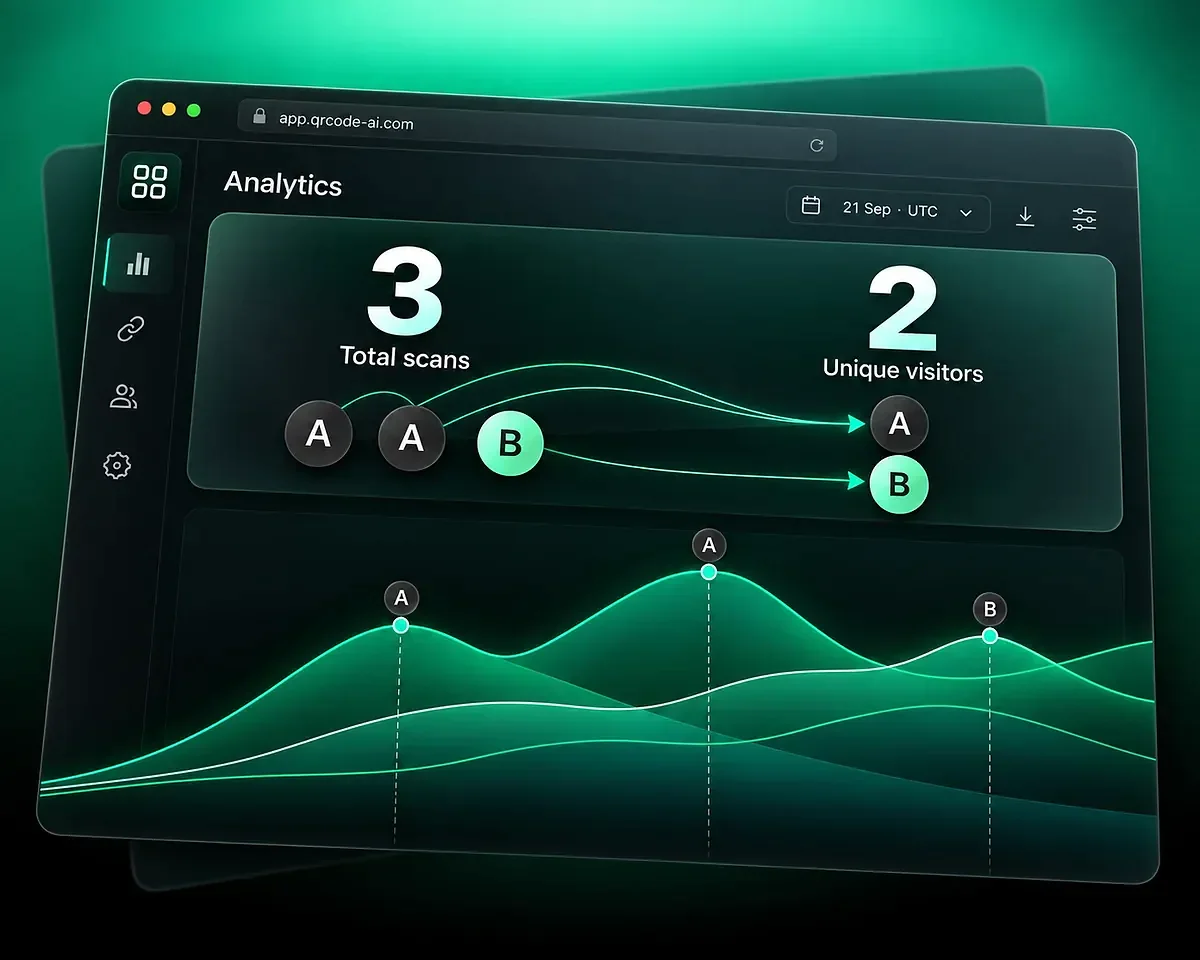
Three scans, two unique visitors

During one UTC day, visitor A produces two counted scans and visitor B produces one. The report shows three total scans and two unique visitors for that day. Returning means another counted event within the same UTC day.

Illustrative activity within one UTC day: visitor A scans twice and visitor B once, giving three total scans and two unique visitors.

A new daily count at midnight UTC

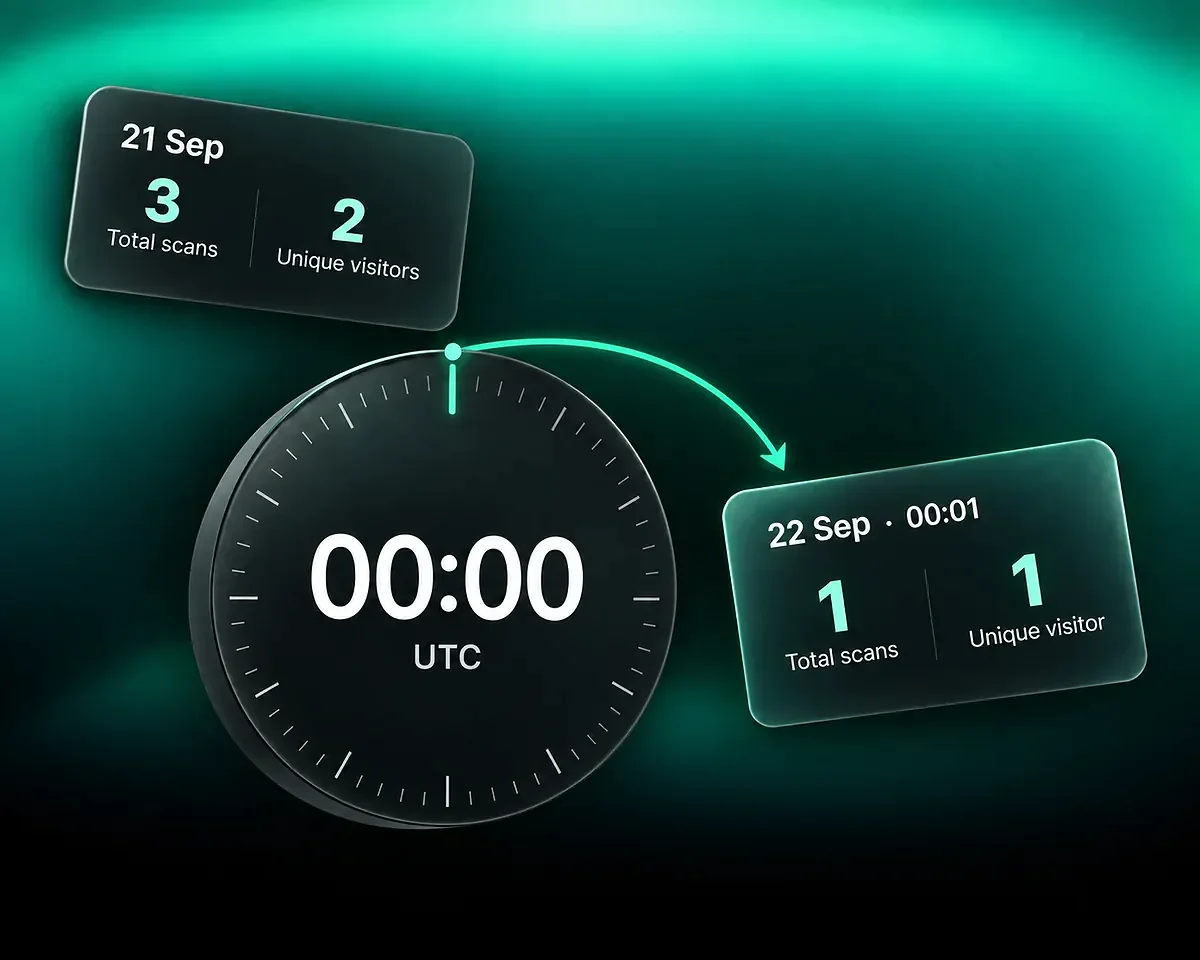
If the first visitor scans again the next UTC day, that day has one total scan and one unique visitor. The previous day’s three scans and two unique visitors remain in the history. The visitor identity rotates daily, so the report does not establish a repeat customer across those days.

Clock at 00:00 UTC: day 1 retains three scans and two unique visitors; day 2 starts with one scan and one visitor.

Compare two campaign placements

Use separate QR codes or Smart Links for placements you want to distinguish. For example, give a poster and a counter display their own QR codes.

  1. Step 1

    Choose the items and period

    Select two to four QR codes or Smart Links in Analytics. Choose the same reporting period and Total or Unique mode so that the comparison has a consistent basis.

  2. Step 2

    Inspect the differences

    Compare activity over time, then narrow the view with supported device, location or campaign filters. More events describe more recorded activity; they do not by themselves prove more sales.

  3. Step 3

    Export the events you need

    Export the filtered QR scan or Smart Link click records to CSV. The export remains event-level even when the dashboard shows Unique. Demo, Magic QR and member-specific Workspace views are not exported.

Compare activityLast 30 days01 SEP30 SEPQR codesLinksSelected itemsPosterCounterYou

Connect the numbers to your campaign

Use campaign labels, destination outcomes and shared reports to explain what happened during the selected period.

Campaigns and referrers

Tracked QR codes and Smart Links expose supported UTM dimensions, including source, medium and campaign. Referrer domains and URLs belong to Smart Link reports; they are not available in QR reports.

QR scans Link clicks Referrer · links only Campaign labels Sourcenewsletter Mediumemail Campaignsummer

Destination Rule performance

Open the read-only rule-performance flow from Analytics to see traffic counts, shares and a timeline for the current outcomes. Removed outcomes remain grouped under Former rules. The rule editor stays separate.

Reports you can share

Publish a read-only dashboard with a shareable address for an individual QR code or Smart Link. It shares aggregated statistics without the destination URL or individual visitor details. Rotate or revoke the address when needed.

Sample01 SEP30 SEP

Follow campaign traffic beyond the redirect

Use consistent campaign tags when you want to connect a QR placement or shared link to your website reports. Google explains how UTM parameters identify referring campaigns. Your website still needs its own analytics setup; this does not turn a scan or click into a measured conversion.

For an app campaign in print, create an app download QR code and measure its scans. Reaching an app store is not proof that the visitor installed the app.

QR Code AI in numbers

Track managed QR codes and Smart Links with QR Code AI, a platform used by 500,000 people across more than 200 countries.

Smart Links created

4M

Users

500K

Countries represented

200+

QR code tracking questions

Understand which events are measured, how reports differ and what access includes.

You can measure scans of QR codes that use a managed QR Code AI address, including supported hosted and dynamic destinations. Direct QR codes, such as WiFi or vCard codes, store their information in the symbol and have no tracked redirect. Uploading an existing QR image does not add a scan counter or recover earlier scans.

Total scans count recorded scan events. Unique scans use a daily rotating visitor identity, so repeated events from the same visitor within one UTC day do not each become a new unique visitor. The identity changes each day. A returning visitor in this report generated another counted event during the same UTC day; this is not a measure of repeat customers across days.

Scan reports show context such as country, city, device, browser and language. They do not tell you the name of the person holding the phone or provide continuous tracking of that person. Collecting information through a form is a separate action from recording a scan.

A QR scan and a website visit are different events. QR Code AI excludes bots and preview crawlers, checks access gates before normal analytics, and counts password-protected traffic after a successful unlock. Your website records activity through its own analytics setup. Compare the date range, event definitions and filters before expecting the counts to match.

You can compare two to four QR codes or Smart Links in one view using the same reporting period, Total or Unique mode, and supported filters. A QR code records scans and a Smart Link records clicks, so keep the channel and placement in mind when interpreting the comparison. Magic QR is not included in this comparison selector.

Export QR scan or Smart Link click records to CSV for the selected date range and supported filters. The CSV contains events even when the dashboard is in Unique mode; it does not export unique-person profiles. Demo data, Magic QR and member-specific Workspace views are excluded. You can also share a read-only dashboard with aggregated statistics, then rotate or revoke its address.

Open rule performance from the Analytics ranking for a QR code or Smart Link with active Destination Rules. Its read-only flow shows counts and percentages for current rule outcomes, A/B branches and the default destination, with a timeline for the selected period. Traffic from removed rules stays grouped under Former rules. Editing the routing is a separate action.

Free creation allows three QR codes and three Smart Links in a personal account and separately in each non-Premium Workspace. A seven-day trial starts with the first QR code or Smart Link creation in that scope; the first eligible scan or click starts it if an asset exists outside the normal creation flow. After seven consecutive days, Premium is required in that scope to keep the affected managed destinations active. Attempts while deactivated are not counted in customer analytics or added later. Direct QR data encoded in the symbol does not expire because of this trial.